
Reviewed · TOKYO
Japan: eSIM with Unlimited Local 4G/5G Data
Japan’s trains, maps, translation apps, restaurant pages, and payment tools all work better when your phone connects the moment you arrive. This KDDI au eSIM gives you local 4G or 5G data without hunting for a shop or swapping a tiny plastic SIM. I like the quick QR-code setup and the choice between an unthrottled Ultra plan and a cheaper Lite plan capped at 10 Mbps.
I also like that hotspot sharing is allowed, with stated limits, and that the network has worked well for some users even on the subway. The main catch is timing: the service counts by calendar day, not by a full 24-hour period, and the QR code arrives separately by email one day before your activity date.
Key points at a glance
- Two KDDI au plans: Choose Ultra for unthrottled 4G and 5G, or Lite for unlimited data at speeds up to 10 Mbps.
- No physical SIM card: Install the eSIM by scanning a separate QR code sent by email.
- Coverage across Japan: The plan is intended for local data service throughout Japan, with 5G availability affected by location.
- Calendar-day billing: The clock starts when you first connect in Japan, and a late-night activation can still count as a full day.
- Hotspot sharing is allowed: Tethering works, but the permitted amount depends on your plan and duration.
- Data only: Voice calls and SMS are not included, so you need apps for calls and messages.
Why a Japan eSIM can make your first hour easier
Arriving in Japan is exciting, but the first few minutes can be a practical puzzle. You may need a train route from the airport, a translation app, a hotel address, or a digital ticket. With this eSIM already installed, you can switch to local data after landing instead of searching for a SIM counter.
That convenience matters most if you arrive late, change cities often, or do not want to remove your home SIM. You keep your physical SIM in the phone and use the eSIM for data, assuming your device supports dual SIM use in the way you need.
The service covers Japan rather than just one city. That makes it useful for a trip that combines Tokyo, Kyoto, Osaka, Hiroshima, or other parts of Honshu. The supplied information identifies the coverage area as Japan, but it does not promise a particular signal level in every building, station, mountain area, or underground passage.
Other Tokyo days people book alongside this one:
- Mt Fuji and Hakone 1-Day Bus Tour Return by Bullet Train
★ 5.0 · 26,383 reviews - 1-Day Tokyo Bus Tour
★ 5.0 · 14,250 reviews - Tokyo: teamLab Planets TOKYO Digital Art Museum Entry Ticket
★ 4.6 · 9,779 reviews
Ultra or Lite: choosing the right KDDI plan
The two plans serve different kinds of phone users. The Ultra plan offers unlimited local 4G and 5G data with no stated throttling. If you expect to use maps all day, upload photos, stream video, work online, or share a connection often, this is the safer choice.
The Lite plan also provides unlimited local data, but its maximum speed is 10 Mbps. That is generally enough for maps, email, web pages, translation, messaging, and ordinary social media. It may feel less comfortable for heavy video use, large downloads, or several connected devices.
The Lite plan runs from three to ten days. Ultra can be selected for three to thirty days. This is an important difference if your trip is longer than ten days. The exact price shown for this experience is $10 per person, but the selected duration and option determine what you receive, so check the final plan details before paying.
I would choose Lite for a short city break where the phone is mainly a guidebook and ticket wallet. I would choose Ultra for a longer trip, a work trip, or a holiday where you expect to use your phone as a full-time connection.
Installing the QR code before you fly
The QR code on the booking voucher is not the eSIM QR code. The actual installation code arrives separately by email one day before the activity date. This distinction is easy to miss, so save the correct email and do not try to install from the voucher.
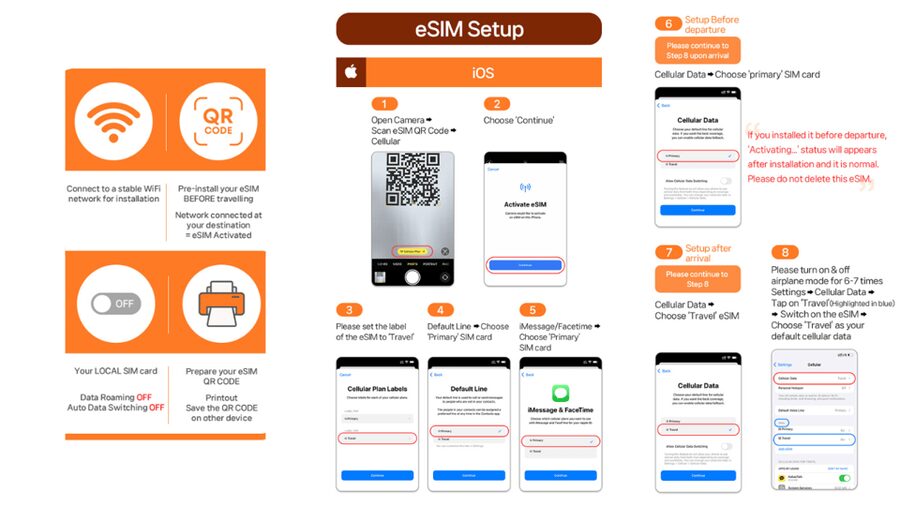
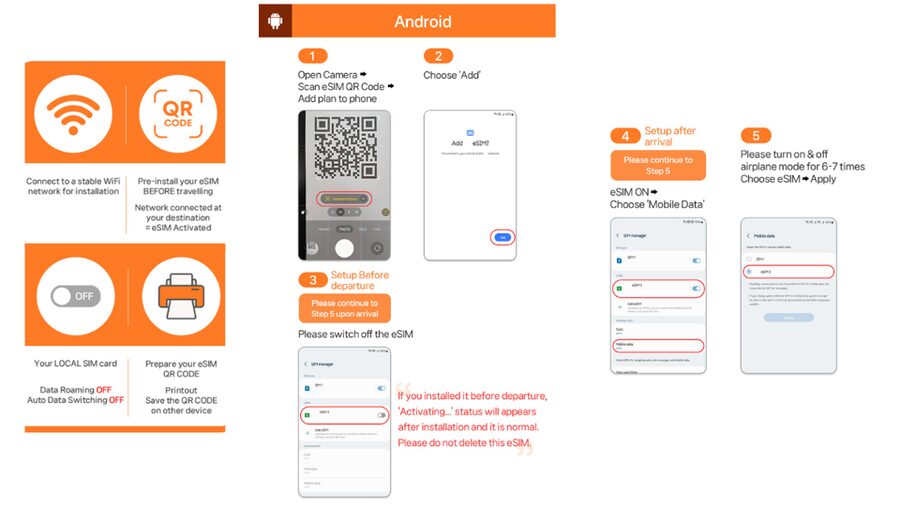
Install the eSIM while you still have reliable Wi-Fi. You can usually add it through your phone’s mobile or cellular settings by scanning the code, but the exact menu wording varies by device. Keep the email available until the installation is complete.
Before buying, confirm two basic points:
- Your phone supports eSIM.
- Your phone is unlocked for a foreign SIM or eSIM.
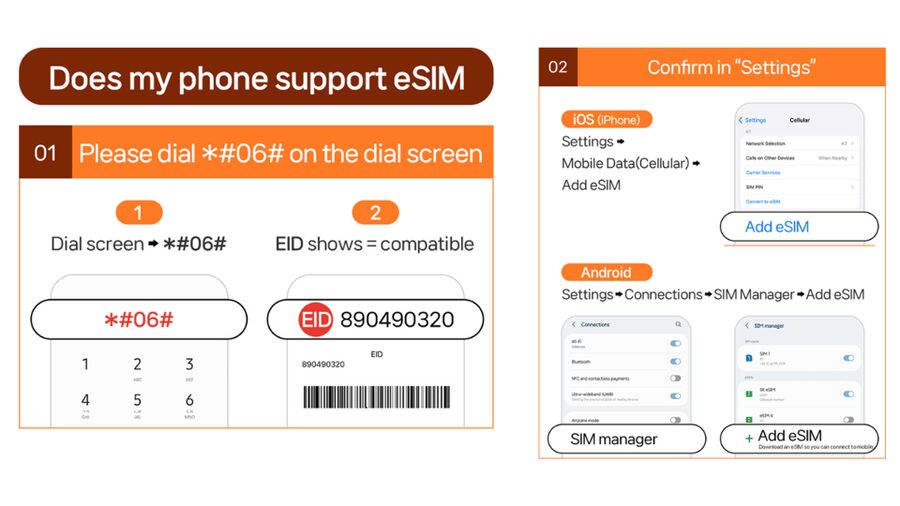
A quick compatibility check is to open the phone dialer and enter #06#. If an EID appears, the device supports eSIM according to the supplied instructions. If no EID appears, the phone is not compatible with this eSIM.
Do not wait until you reach Japan to discover a problem. An airport connection may be busy, and a dead battery or weak Wi-Fi signal can turn a simple setup into a nuisance. Since refunds are not accepted once the eSIM QR code has been sent, compatibility deserves attention before purchase.
What happens when you arrive in Japan
The eSIM connects to the local network only after you arrive in Japan. Installing it at home does not start the service, so you can prepare ahead without using up your purchased days.
Once you land, your phone should connect to the KDDI au network if the eSIM is selected for mobile data and the relevant settings are enabled. You may need to make the eSIM your data line and ensure data roaming settings match the supplier’s setup instructions. The supplied guide and FAQ are available at https://psce.pw/79uszq.
The service uses KDDI au 4G and 5G. A 5G icon is not guaranteed at every moment. Indoor spaces, underground stations, crowded areas, and other physical conditions can cause the phone to switch to 4G. That is normal network behavior, not necessarily a fault with the plan.
One useful point from the setup instructions concerns an invalid QR-code message. If your phone says the QR code is invalid, check the SIM settings first. On an iPhone, go to Settings, then Cellular. On an Android phone, go to Settings, then Connections, then SIM Manager. A new eSIM may already appear there even if the scan screen reports an error.
If you still have trouble, contact the supplier through the provided email or WhatsApp support. Keep your phone connected to Wi-Fi while troubleshooting.
A completely different kind of day in Tokyo:
- Mt Fuji & Hakone Cruise, Drum Show Bullet Train 1 Day from Tokyo
★ 4.0 · 7,413 reviews - Tokyo: Shinjuku Food Tour (13 Dishes at 4 Local Eateries)
★ 5.0 · 6,603 reviews - Tokyo Mt Fuji 5th St & Hakone Cruise Bus Tour w/Bullet Train
★ 4.4 · 5,024 reviews - Flagship 2-Hours Official Street Go-Kart Tour – Tokyo Bay Shop
★ 5.0 · 4,974 reviews
Calendar days make the start time important
This is the detail most likely to affect the value of your purchase. Usage is calculated by calendar day from the first connection to KDDI au in Japan. It is not a rolling 24-hour period.
Suppose you arrive at 10 PM and activate the eSIM. That evening counts as one full day, and the next calendar day begins at midnight. A late arrival can therefore use two counted days after only a short period of actual use.
For this reason, avoid activating the eSIM before you need it. Installation is fine before departure, but connection should wait until you are ready to use the plan in Japan. If your flight lands close to midnight, consider how the plan length fits your schedule.
The QR code must be installed and activated within 30 days of purchase. That gives you some planning room, but it also means this is not a product to buy many months before an uncertain trip.
Using maps, translation, and Japanese transport apps
The real value of local data is not simply having internet. It is having it at the moments when small delays cost time. You can check a rail connection, translate a sign, pull up a hotel address, or look for an open restaurant without depending on station Wi-Fi.
Japan’s rail system can involve several operators, transfers, platform changes, and station exits. A working data connection lets you confirm directions as you go. It is especially useful when you leave a station and need walking directions to a hotel or attraction.
A local data connection also helps with digital tickets, reservation details, and messages to accommodation providers. Since voice and SMS are not included, use internet-based services for communication. The plan itself does not give you a Japanese telephone number.
The unlimited allowance is helpful for frequent map use and app updates, but unlimited does not mean every activity has the same experience. Ultra has no stated speed cap. Lite remains limited to a maximum of 10 Mbps, so large files and high-quality video can take longer.
Hotspot sharing and the limits to understand
Tethering is supported, which is useful if you carry a tablet, laptop, or a second phone. It can also help a companion who needs a quick map check or message.
Hotspot allowances depend on the selected plan and duration. The stated limits are:
- Three days: 3 GB
- Four days: 3 GB
- Five days: 4 GB
- Six days: 5 GB
- Seven days: 6 GB
- Eight days: 7 GB
- Nine days: 8 GB
- Ten days: 9 GB
- Fifteen days: 15 GB
- Twenty days: 19 GB
- Thirty days: 30 GB
These limits are separate from the unlimited local data advertised for use on the phone itself. If you plan to run a laptop through the eSIM for work, check the tethering allowance carefully. It is generous enough for basic browsing and messages, but regular video meetings, cloud backups, or streaming can use it quickly.
For one person using a phone normally, hotspot limits may never matter. For two people sharing one eSIM, the plan choice becomes more important.
Signal, speed, and the subway question
The available feedback points to strong practical performance. One user found setup easy and reported a signal even on the subway. Another was able to share the connection with other phones and found coverage useful in many places.
Those details are encouraging, but no mobile plan can promise perfect underground service. Japan’s subway networks include tunnels, stations, platforms, and sections where the phone may move between coverage areas. The product information specifically warns that location, indoor spaces, underground areas, and crowds can affect 5G and cause a switch to 4G.
That switch is not automatically a problem. For maps, messages, translation, and ordinary browsing, 4G is usually the connection you need. The Ultra option is more appealing if you care about the highest available speed, while Lite is a reasonable fit if saving money matters more than rapid downloads.
Value at $10 per person
At $10 per person, the plan can be good value if it saves you from buying a physical SIM, arranging airport Wi-Fi, or relying on free public networks. The strongest value comes from convenience and predictable access rather than from voice service, since calls and SMS are excluded.
The price is less attractive if you only need data for a very short time or already have a dependable international plan. It is also worth comparing the final cost of the chosen duration, since the two options cover different lengths and have different speed rules.
I see the Ultra plan as the better value for heavy users and longer stays. Lite makes more sense for a short visit focused on maps, rail information, translation, and messaging. The choice is simple: pay for speed and flexibility, or accept 10 Mbps for ordinary daily phone use.
The rating of 4.5 from 163 ratings suggests a generally positive experience, but setup still depends on your phone. A high rating cannot fix an incompatible or carrier-locked device, so check that first.
Who should buy this eSIM
This experience suits you if you:
- Want data ready for maps and transport after landing
- Prefer not to remove your home SIM
- Have an unlocked phone with eSIM support
- Need service across a Japan itinerary rather than one city
- Want the option to share data by hotspot
- Prefer a self-service setup instead of visiting a mobile shop
It is less suitable if you need a Japanese phone number, traditional voice calls, or SMS. It may also be the wrong choice if your phone does not show an EID or is locked to your home carrier.
The plan works best for an independent trip. There is no guide or physical meeting point. You receive the code, install the service, and manage the connection yourself.
Booking, cancellation, and a sensible setup plan
You can reserve and pay later, which is useful if your Japan plans are still taking shape. Cancellation is allowed up to 24 hours in advance for a full refund, but that protection ends once the eSIM QR code has been sent. Since the code arrives one day before the activity date, read the timing carefully.
A practical setup plan looks like this:
- Check for an EID and confirm the phone is unlocked.
- Choose Ultra or Lite based on speed, duration, and hotspot needs.
- Install the eSIM after receiving the separate email.
- Keep your home SIM available if you need your normal number.
- Wait until arrival in Japan before connecting to KDDI au.
- Check the SIM settings if the QR scan reports an error.
- Contact LINK KOREA by email or WhatsApp if the connection does not work.
Should you book the Japan eSIM?
I would book this eSIM if you want simple local data and your phone passes the compatibility checks. The easy QR setup, KDDI au network, countrywide Japanese coverage, and hotspot support make it a practical choice for most independent visitors.
Choose Lite for ordinary phone use over three to ten days. Choose Ultra if you need faster service, plan to use lots of data, or are staying up to thirty days. The two points to remember are the lack of voice and SMS, and the calendar-day clock that can make a late-night activation costly.
For a phone that supports eSIM, this is a useful travel tool at a modest price. Just install it before departure, activate it only when you arrive, and do not mistake the booking voucher QR code for the actual eSIM code.
FAQ
Does this eSIM include unlimited data in Japan?
Yes. Both options include unlimited local 4G and 5G data, but the Lite plan has a maximum speed of 10 Mbps. The Ultra plan has no stated throttling.
What is the difference between the Ultra and Lite plans?
Ultra provides unthrottled local 4G and 5G data and can last from three to thirty days. Lite provides unlimited data at speeds up to 10 Mbps and is available for three to ten days.
Does the eSIM include a Japanese phone number?
No. Voice calls and SMS messaging are not included.
When will I receive the eSIM QR code?
The actual eSIM QR code is sent separately by email one day before the activity date. The QR code on the booking voucher is not the installation code.
Can I install the eSIM before arriving in Japan?
Yes. You can install it before your trip, but it connects to the local network only after you arrive in Japan.
How do I check if my phone supports eSIM?
Enter #06# in the phone dialer. If an EID appears, the supplied instructions indicate that the device supports eSIM.
Does my phone need to be unlocked?
Yes. Your phone must be unlocked for use with a foreign SIM or eSIM.
Can I share the connection with another device?
Yes. Hotspot sharing is supported, but the allowance depends on the selected plan and duration.
How are the plan days counted?
The service counts calendar days from the first connection to the KDDI au network in Japan. Connecting at 10 PM counts as one full day by midnight.
What should I do if the QR code says it is invalid?
Check Settings, then Cellular on iOS, or Settings, Connections, then SIM Manager on Android. A new eSIM may already be listed. If the problem continues, contact the supplier by email or WhatsApp.
Newly reviewed around Tokyo
- Tokyo Asakusa:Calligraphy & Make T-shirt Activity★ 5.0 · 62 reviews
- Intercity Shuttle, Tokyo to Haneda /Narita /Yokohama /Makuhari★ 5.0 · 5 reviews
- 1 Hour Travel around Tokyo with a Professional Photographer★ 5.0 · 3 reviews
- Travel Tokyo with Your Own Personal Photographer★ 5.0 · 43 reviews
- Train in Samurai Swordsmanship and Defeat the Demon in Tokyo★ 5.0 · 5 reviews
- Shuttle Van 6hr Tokyo Tour to-and-from Tokyo, Yokohama and Narita★ 5.0 · 9 reviews
- Kickboxing & Body Training with EX-Pro Fighter★ 5.0 · 4 reviews
- Traditional Japanese Knife Sharpening Class★ 5.0 · 18 reviews